Want to get more helpful tips like this one delivered right to your inbox? Did I mention it’s free? SIGN UP HERE!
It may be 2014, but I am still so skeptical about purchasing items online.
I’m always worried whatever I order isn’t going to look like what it looks like online or it will be different than I pictured it.
This is especially true when its a larger scale item or something that costs a good bit of money.
I absolutely despise paying return shipping fees if its not what I expected.
A lot of times though, prices are just so much better online than in store.
For example, fabric.
Oh my goodness, I could stay in a fabric store FOR-EV-ER.
(Please picture me saying FOR-EV-ER just like the kid with the glasses said it in The Sandlot.
And if you don’t know what I’m talking about, run and find a copy of The Sandlot and watch it.
Even though my brother subjected me to watching it over and over and over again one summer until the VHS finally gave out (thank you, lord), it really is a great movie.
Ok, back to fabric. I love fabric. I buy fabric and have no clue what I’m going to do with it all the time – I just think its pretty.
However, fabric can be so ridiculously expensive – except in this great realm of possibilities that we call the internet.
Seriously y’all, when I was using dial-up internet 15 years ago to download music illegally from Napster (we had no clue it was illegal then), I never dreamed I would one day be able to purchase just about anything I wanted with the click of a button.
Toilet paper. Click.
10 swimsuits from Victoria’s Secret (so you can try them on in the privacy of your home, only to return all 10 of them). Click.
Fabric. Click.
Now that I’ve rambled on and on about The Sandlot, the amazingness of the internet, and other things that the cheap beer I am drinking has led me to type, let’s talk about the real question here:
How I Buy Fabric Online Without Seeing It In Person

This post contains affiliate links for your shopping convenience. Click here to read my full disclosure policy.
Fabrics Pictured Above, Left to Right:
Fynn Jade / Portobello Vase / Linked Navy / Kaleidoscope / Guitars / Hockley Mandarin / Coral Stripes / Morrow Cool Grey / Feathers
Buying fabric online can be tricky.
Is the picture really showing the fabric’s true color?
Is it going to work with your rug?
Will it work with your curtains?
What about those pillows you want to be buried with? (Oh, maybe that’s one just me.)
There are two ways (according to me) you can rest assured you made the right fabric choice when buying online:
1. Order a sample of the fabric (for the patient person and large fabric purchases)
Many online sites that sell fabric offer samples of their fabric as well. Personally, my favorite online fabric stores are Online Fabric Store and Fabric.com. At both stores, you can purchase a small square sample of the fabric you are thinking about buying for about $2 per sample. Shipping and handling on samples are usually free. In 5-7 days you get your samples, put them against your rug, your curtains, your accent pillows, etc., see which works and then order it. You still get the savings of buying your fabric online, you just have to wait a bit longer.
When I was re-upholstering my dining room chairs, I went this route in selecting the fabric. The material I wanted was more expensive than any I had purchased before, so I wanted to make sure it was the right choice. I highly suggest going this route when you are purchasing a large quantity of fabric or a fabric that is more expensive than usual.
If you are impatient like I am most of the time and don’t like to wait to get your samples or the place you are buying from does not sell samples, you can go with option #2.
2. Create a collage of your fabric options and your current patterns & colors in your home (for the impatient person)
This is the route I usually go when buying fabrics online. I’m usually impatient and when I dream up a project – I want what I want when I say that I want it.
First, save images to your computer of the fabrics you are considering. You can usually drag them to your desktop on a Mac or do a right click and save image on a PC.
Next, take photos of your rugs, curtains, wall colors, etc. If you can find these items online, you can also save the images as you did above.
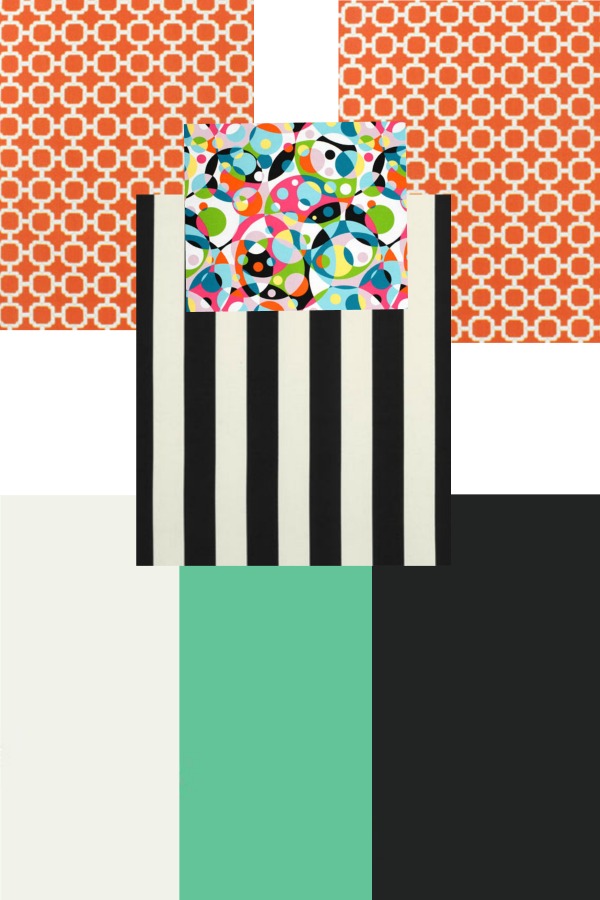
Now, go to PicMonkey and click Design, then select one of the options, I usually click the 5×7 one. Leave the canvas color white. Click on the Overlays button, which is the butterfly icon on the left side. Select Your Own at the top and choose a file of one of your fabric options. Continuing adding in all your files with the Your Own button until you have all your fabric options, rugs, curtains, wall color, etc. on the image.
Make the images larger so that you can actually see the curtains and patterns and play around with them until you decide which work best together.
This method is what I used for selecting the fabrics on my screened-in porch makeover. Here is what my image I made on PicMonkey looked like in the end.
And just in case you are wondering what all those colors and patterns are:
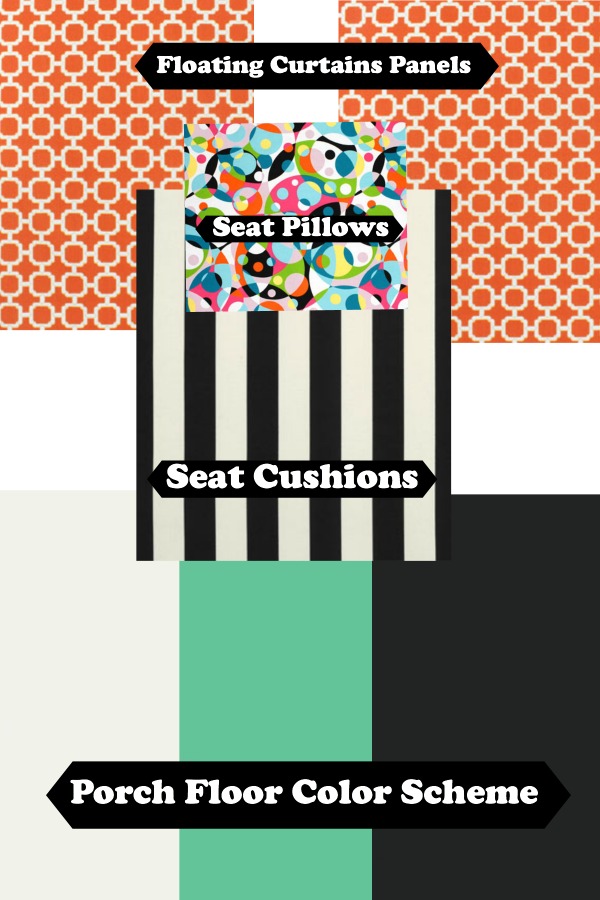
I grabbed images of the colors of my porch floor from Home Depot, then just pulled in the rest of the images of the fabrics I was considering. I knew I was good to go with all my fabric choices after making the collage on PicMonkey.
Don’t believe me?
Its all good, I wouldn’t believe me either – I’m a freak. See how it all came together in the porch reveal here.
Need affordable, but pretty fabrics? Then be sure to see these 50+ Home Decor Fabrics Under $15 a yard!
And if you need a way to protect that fabric read this about How to Waterproof & Repel Stains on Fabric.
More Helpful Picmonkey Tutorials:
17 PicMonkey Tutorials, Tips & Projects – you won’t believe all you can do with it!
DIY Party Invitation – Yep, I even create my kiddo’s birthday invitations with it!
How to Make a Party Banner with Picmonkey – easily customizable for any party!
You know you don’t wanna miss any of this crazy.
Sign up to get my posts delivered to your inbox here.
Stalk Me Here:
Pinterest / Facebook / Twitter / Instagram
Leave a Reply