How to Grow Your Blog with Pinterest

How to Grow Your Blog with Pinterest

Written by

in

Pinterest is big. Wait, let me rephrase. Pinterest is ginormous. Really guys, its huge. A LARGE portion of my blog traffic is due to Pinterest. That’s why I told you to pin your own photos in the 12 Tips to Grow Your Blog post! Because Pinterest is so big, its a great source for growing your blog!

Here’s how to grow your blog with Pinterest.

Learn tips and tricks to utilize Pinterest in growing your blog. How to Grow Your Blog with Pinterest
First off, in order to grow your blog with Pinterest, you need “pin-worthy” photos in your posts. Take a look at most of the pins on your boards. Don’t you have pins that are clear, focused, cropped, and bright? Your photos can make or break you on Pinterest.
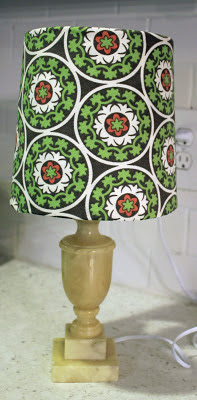
I’ve been working hard to really make my photos pin-worthy lately. Here’s an example of a photo from a 2011 blog post about a lamp makeover:
Learn to grow your blog with Pinterest.

And here is a photo from later on in my blogging career about another lamp makeover:

lamp makeover

See the difference? The latter photo is bright, clear, and sharp. I added an overlay with my blog title on it and a banner with the title of the blog post.
Having great photos will not only help grow your blog through Pinterest, but it will keep readers interested in your post, and other posts on your blog.
Click here to see the post on How to Make Your Photos Pin-Worthy with PicMonkey
A few more things you need to do to ensure you grow your blog as much as possible with Pinterest:
  • Make sure you have a “Pin It” button on each photo in a blog post. You can read about doing this in my 12 Tips to Grow Your Blog post.
  • Having Pinterest followers is VERY important. Make sure there is a place on your blog where readers can find your Pinterest account and follow along. I have the social media buttons on the top of my sidebar.
  • Pin your own photos! I talked about this in my 12 Tips post, but wanted to remind you! Pin your photos onto more than one of your boards. Some people only follow certain boards and not all of them. Like for my lamp makeover post, I would pin it on my Rain on a Tin Roof board (just for my blog posts) and on my DIY board.
  • Add a Pinterest Tab to your Facebook page. This will allow people who like your Facebook page to see that you have a Pinterest account, look at your pins and follow you. Go here to learn how to install it. My Facebook fan page is shown below with the Pinterest tab.
Grow your blog with Pinterest
  •  If you haven’t converted your personal Pinterest account to a business account, do it now. This allows your url to be seen on your Pinterest profile (like you see on mine below). Go here to convert your account.
How to Grow Your Blog with Pinterest
  • Did you know you can see what people pin from your site? Yep, you can! Get ready to stalk this page! Go to: http://pinterest.com/source/YOURBLOGURLHERE Make sure you include the dot com. For example, when I want to see what people are pinning from my site I type in http://pinterest.com/source/rainonatinroof.com. Go see what people are pinning from your blog, it will give you an idea of what people like from your blog and what you could post more about.
  • Don’t just pin photos from your blog. Share the love! Pin things you truly like or that describe you. It helps your followers know what kind of person you are.

Read more of the Grow Your Blog Series:

My Blogging Story

7 Things Your Blog Needs to Keep Readers Coming Back

How to Make Your Photos Pin-Worthy
10 Ways to Make Money Blogging
12 Tips for Growing Your Blog 

Learn tips and tricks to utilize Pinterest in growing your blog. How to Grow Your Blog with Pinterest

I would love to have you follow me on Pinterest! I pin all sorts of crazy things, y’all!

What are your Pinterest tips?

You know you don’t wanna miss any of this crazy.

Sign up to get my posts delivered to your inbox here.

Stalk Me Here:

Pinterest / Facebook / Twitter / Instagram

Comments

55 responses to “How to Grow Your Blog with Pinterest”

  1. Hi Jenna…I can’t seem to get my Pin it hover to work over my pictures??? I use blogger…and followed the tutorial from your 12 tips..but, not sure where to post the code?

    Thanks,
    Julie

  2. Ooops…just figured it out!

    Thanks!!!
    Julie

  3. Good pictures can really make a difference! Great advice. 🙂

    toddlindsey.com

  4. Your button is up and running on my page as well…thank you!!

  5. Thank you so much for posting this! I didn’t know you could see who pinned your stuff! I will be on that all the time now! Looking up how to add my Pinterest page to my Facebook page now!

    -Sarah
    limitedspaceorganizing.blogspot.com

  6. Great tips! Thanks for sharing!

  7. This is so incredibly helpful! I’m very familiar with PicMonkey…but I still have having a difficult time “framing” the shot. I’m trying to be more creative…this is just something that is a little more difficult for me. I’d love any adivce you’d be willing to give or things for me to think about when it comes to taking a great picture. I’m definitely bookmarking this post to refer back when I get stuck. Thanks a million!

    Katie @ thoughtfulology.blogspot.com

  8. Saw your link on Chic on a Shoestring Flaunt it Friday. Nice post! I have lot of amazing followers on Pinterest. Still working on converting that to blogger and gfc followers. Thanks for the share. I need to add the Pin It button to my photos instead of just on the main page template. Good advice!

  9. Great tips, thank you!

  10. Great info. I just pinned it. Have a great week.
    Debi and Charly

  11. Great post. My photography is definitely (one of) my weakness. I need to work on it a ton!

  12. I cohosted FFF today. Thanks for stopping by. Will have to come back later and read some more. Love your blog and the content. Started following. I blog over at five27jones.blogspot.com. Still working on getting it all set up and content lined out. Been blogging about my family for a few years just for people I know but just started this blog to expand. Blogging is addict ing!

  13. Thanks for the Pinterest tips, and for being the first comment on my blog! =)

  14. Ok PicMonkey is going to become addictive, I was just following your tips on how to use that site, and I made a picture look so much better. Yea! THANK YOU!!!

  15. Great tips!!! You are so right, Pinterest is definitely where it’s at!!! XO, Aimee

  16. Great advice! You know, I didn’t realize I should be pinning my posts to not only the board specifically for my posts but my normal boards too. It kind of just his me a week ago and reading this post reaffirmed it. Some people are only following a handful of boards (typically not my post boards!). I need to start doing this asap! Thanks for the share, Jenna! It’s wonderful seeing your blog mature! I love the new photo of you on your side bar, too.

  17. I didn’t know about a Pinterest tab for my Facebook page!! I’m doing that now! Thank you!

  18. Wow- this is great! Thanks for the tips and sharing them with all our readers on the Ladies Holiday Photo Friday Blog Hop! We hope you share again 🙂

  19. Nicki Parrish

    Thanks for the great info! I will use this! Your newest follower for DIY Showoff.

  20. Thank you so much for the encouragement and how-to’s. Much appreciated!

  21. Thank you for the wonderful information. I will be coming back!

  22. Love it! My latest adventure on Pinterest is creating custom board covers for all my boards…that is quite an overhaul with 100+ boards though so I don’t have them all updated yet!

    Helen
    Blue Eyed Beauty Blog

    Found this post via The Clever Chicks Blog Hop!

  23. Thanks for all of the great Pinterest tips and tricks.
    Bev

  24. Great post; I can’t wait to start using some of these tips. Visiting from Monday Funday.

  25. Thanks for sharing this. I definitely need to work on my photos! (found you via Sumo’s link up)

  26. I need help I wnat to convert my pinterest account and when I get to this steps 1-3

    1.Download the snippet file from Pinterest.
    2.Upload the file to your website.
    3.Click the “Click Here” link to complete the process.

    I can not do step 2. upload it back to my blogger web page. I just can not figure it out. can any one help me? Thank you so much.

  27. I love you you walked us step by step through how you do this. The second picture is amazing!

  28. Great tips! I remember when I figured out how to see what people pin from my blog. It’s so fun to check it every few days to see what people are pinning!

    Visiting from The Chicken Chick 🙂
    Tammy
    ourneckofthewoods.net

  29. great tips! catching you. 🙂

    gail

  30. Pinning to look at later, great ideas here!
    Visiting from I Gotta Create
    Amanda

  31. This is great! Thanks so much!

  32. Great tips! Thanks for sharing!
    – Lora

  33. Amanda @ Portable Kid

    Thank you for posting. Great info!

  34. Great tips…I want to try that overlay option!
    Thanks for sharing!
    Stacey of Embracing Change

  35. Thanks so much for this post. I’m glad I came across it, because I couldn’t figure out for the life of me how to get our social media tabs on our Facebook page. Now it’s got everything on it, so thanks for that and letting us know about Picmonkey.

  36. Wonderful and helpful!! Thank you so much. Will be continuing to go through this series you have created.

  37. Hi Jenna,
    Just wanted to thank you for publishing such a useful post! I’ve been blogging for about 5 months and am enjoying it more than I thought I would. However, it is hard to find information on how to grow your blog. The info. you provided is going to be very helpful! Thank you!

  38. Thanks for putting this together. I just listened to a podcast last week that talked about how important Pinterest is to the growth of your blog and she mentioned Pic Monkey – I have been using it all week and love it! It is so much easier than Photo Shop Elements! Really enjoying your blog!

    Best
    Chernee

  39. Jenna, thanks for this post, it was really useful! I’ve recently set up my Pinterest Profile and since then, I’ve noticed that the traffic to my website is increasing. I always make sure to include nice images and typography that defines me as a designer, but also, I always try to upload new material! I really like your blog, keep it up!

    1. That’s awesome! I’m so glad the post was so helpful for you!

  40. Great tips, Jenna! But I just did something contrary — tell me if you think it was a big mistake — I started a board called “Blogging Lessons Learned” and posted some ugly photos. Yay or nay? (@delightfulrepas, if you want to check it out)

    1. I think its fine! Its a nice little way to keep it real!

  41. Thanks, Jenna! I feel better about it now, hearing that from someone who knows far more about Pinterest than I do!

  42. Robert Mickalson

    Super helpful stuff. I do real estate, and went around town taking hundreds of pics…. can’t wait to start using your tips… especially the picmonkey tool. Thanks for sharing!

    1. I am so glad they were helpful for you, Robert!

  43. […] 2. How to Grow Your Blog with Pinterest […]

  44. PicMonkey is amazing!!! I’m an experience photoshop user but THIS is pure brilliance. SO excited. Thanks for posting about it!

    1. It is, Jess! Glad the post was helpful!

  45. […] addicted online world, pictures are literally worth a thousand words. Consider this thought from Jenna at Rain on a Tin Roof when it comes to using Pinterest to expand your […]

  46. This is so very helpful! Do you have any tips on how to add buttons, I have tried this but keep failing (miserably) I have no idea what I am doing wrong it seems like it should be easy, but then fail. Help! 🙂

    1. I’m so glad it was helpful! Try googling on the how to add buttons!

  47. […] How to Grow Your Blog with Pinterest from Rain on a Tin Roof […]

  48. […] How to Grow Your Blog with Pinterest from Rain on a Tin Roof […]

  49. Great Post! Very helpful. I just launched my blog this week so looking forward to implementing these tips!

Leave a Reply

Your email address will not be published. Required fields are marked *